Agents, Web App and Desktop#
Choose the assistant that matches your research task, then explore its workflows and setup below.
Connect hydrological models with geophysical observations. Use natural-language guidance to configure, run and inspect hydrogeophysical workflows in the web app or Desktop Studio.
Build pseudo-geological models from joint gravity–magnetic inversion results and generate geological interpretations. Available as an optional assistant in Desktop Studio.
AQUAH for hydrogeophysics#
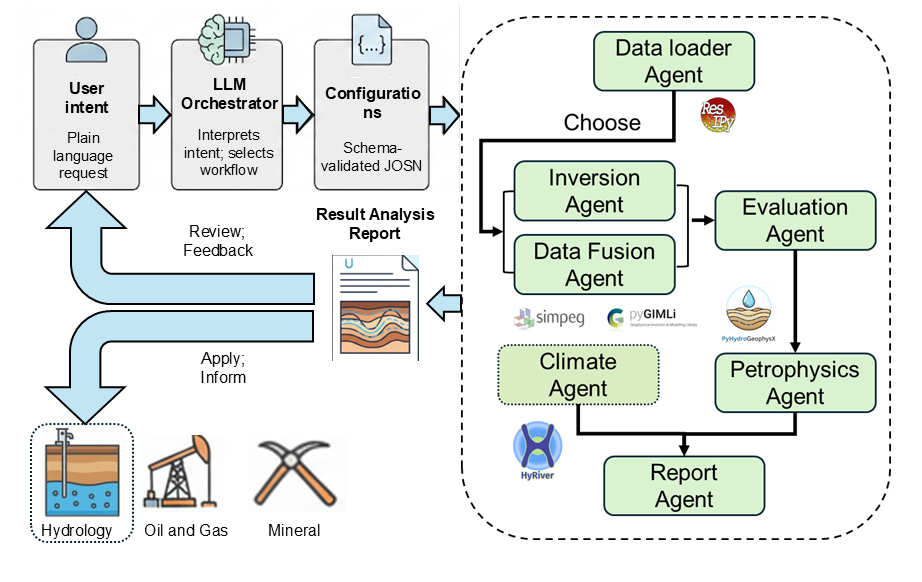
AQUAH is PyHydroGeophysX’s built-in assistant for natural-language hydrogeophysical workflows. Start with the hosted web app or use Desktop Studio for interactive work. Its agent workflows include ERT, seismic refraction, FDEM and joint ERT+SRT inversion.
Open AQUAH in your browser, with launch guidance and required inputs.
Use AQUAH alongside the scientific tools. Download Studio for Windows or macOS, or run it from source.
Configure providers and run your first AQUAH workflow.
GeoSAGE for geological modeling#
GeoSAGE combines joint gravity–magnetic inversion, pseudo-geological modeling and language-model-assisted interpretation for the Hannah and Iowa case studies. Install it as an optional assistant in PyHydroGeophysX Desktop Studio to run configured workflows or explore existing models.
Recover density and magnetic susceptibility models from gravity and magnetic observations using configured, reproducible workflows.
Build pseudo-geological models from recovered physical properties, then use specialized agents to generate and review interpretation reports.
Inspect model sections, 3D volumes and data-fit figures. Run numerical tasks offline, or configure an AI provider for interpretation and review.
GeoSAGE reference
Fang, Z., Yang, P., Liu, Y., Feng, D., & Chen, H. (2026). GeoSAGE: A Multi-Agent Workflow for Geological Reasoning From Joint Gravity and Magnetic Inversion Models. Computers & Geosciences, 106282.
View the citation guide for references to GeoSAGE, PyHydroGeophysX and the numerical engines used in your analysis.
Contents
- Agent Web App
- Agent Workflow: folders, references and MCP
- Quick Start Guide
- Common Workflow Patterns
- Agent Reference
- Adding an assistant
- GeoSAGE assistant
- Troubleshooting
- Data File Not Found
- API Key Missing or Invalid
- Wrong ERT Instrument Declared
- pyGIMLi or SimPEG Import Fails
- Mesh Generation Fails
- Inversion Diverges
- Streamlit Upload Size Exceeded
- Joint ERT+SRT Geometry Mismatch
- LLM Rate Limit or Quota Error
- Resuming a Failed or Interrupted Workflow
- 3D Mesh Generation Fails (gmsh not found)
- 3D Electrode View is Blank
- Quality Loop Never Reaches Threshold
- Ambiguous Natural-Language Request
- System Overview